This blog has moved! All new posts will be on charlesmartin.com.au and all the current posts have migrated there too, so please leave comments there instead.
Showing posts with label duetforvibraphoneandcomputer. Show all posts

20 September 2009

Performance at the Hughes Festival of Music!

On Friday, I performed with Chi-Hsia Lai and Veronica Walshaw at the Hughes Festival of Music - in a bakery! The programme was:
  • Duet for Vibraphone and Computer - Charles Martin
  • Hands on Stage ^2 - Chi-Hsia Lai and Charles Martin
  • Libertango - Eric Sammut
  • Djilile - Peter Sculthorpe
  • Electric Counterpoint - Steve Reich
  • Descendo a Serra
  • Tropical Feeling - Nebojsa Zivkovic
  • Ghanaian Bells - Gary France
A bit tricky to fit a marimba, malletkat, computer vision surface and other percussion instruments into the venue but we did it!

21 May 2009

Show at the Front!

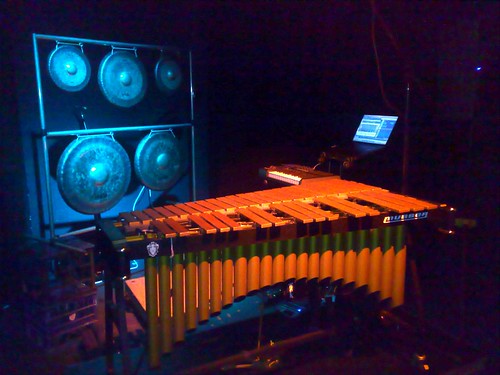
I played tonight at the Front! Fun! My setup was vibraphone and Ableton Live + Pd.

Blogged here.

Recordings:

26 October 2008

Duet for Vibraphone and Computer


Performers who use computers to make music often spend a lot of time creating and learning to play new instruments. As a percussionist incorporating computer music technology into my performance I have been faced with a conundrum. I want to be able to control and interact with a computer system in my performance but I don't want to abandon the incredibly expressive act of playing percussion instruments. The topic of my current research is to find solutions to this problem, that is, techniques for controlling computer music systems while playing with conventional techniques on a relatively unmodified instrument.

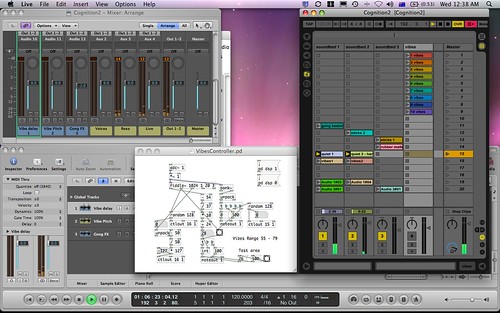
One of my projects is to create improvised duets for computer and vibraphone. My idea is that a computer would play short pre-recorded vibraphone sounds as a counterpoint to my live improvisation. The computer runs a custom piece of software written in the Pure Data language (Pd) to analyse audio input from a microphone over the vibraphone. The computer software is able to recognise attacks and detect the pitch and dynamic of notes that I play. This information is used to send MIDI messages to control software such as (Ableton) Live and (Apple) Logic Studio which plays back the pre-recorded sounds and applies effects.

For example, in a particular improvised piece called Cognition, I divide the vibraphone into ten (imaginary) zones, each one consisting of 3 or 4 adjacent notes. When I strike a note in a particular zone, the Pd program hears the attack and fires off a MIDI message to Ableton Live which then plays one of ten vibraphone recordings. Thus, when I play a melodic line on the vibraphone the computer simultaneously plays a melodic line constructed from sections of the ten recordings. In practice, this simple concept produces a striking variety of sounds from the computer that have a natural and clear relationship to what I play on the vibraphone.

To spice things up, both the live vibraphone sound and the recordings on the computer can be sent to a multitude of effects. I used some interesting reverbs in Logic Studio and complex delays and resonators in Live. Of course, if the effects were on all the time it would cover up the melodic line. Again, my Pd program listens to the live sound and converts the pitch and dynamics that it hears into MIDI messages that tell Logic and Live to send more or less of the live and recorded vibraphone sounds to the effects.

The end result is a setup where I can control effects and recordings from the computer by playing an unmodified vibraphone with only one microphone. In this performance the computer acts more like a musician than the pre-recorded tape that is commonplace in pieces for ``percussion and electronics". Since the sounds that the computer produces are not composed but created as a reaction a live musician this music is a true duet.

Recording of ``Duet for Vibraphone and Computer" as performed in October 2008 at The Street Theatre in Canberra

25 August 2008

Theremin to MIDI Control program in Pd


** Update - throughout 2008 and 2009 I used these techniques with the vibraphone in my piece "Duet for Vibraphone and Computer"

Over the weekend I wrote a simple program in Pd that analyses an audio input and then uses pitch and amplitude information to output a midi control value.

My idea was to use my little theremin as the audio input and send the midi data to an internal midi bus which is received by Ableton Live for controlling parameters of some effects. Since the theremin has such a simple sound the pitch and amplitude analysis works extremely well. To achieve this feat I use the excellent fiddle~ object (written by Miller Puckette) and... well not much else really! A few * and + objects adjust the output values so that they are sensibly distributed between 0-127.

Here's the code (or just copy from the picture!):

#N canvas 738 31 442 441 10;
#X obj 88 21 adc~ 1;
#X obj 88 44 *~ 1;
#X obj 29 91 *~;
#X obj 59 91 tgl 15 0 empty empty empty 17 7 0 10 -262144 -1 -1 0 1
;
#X obj 29 114 dac~ 1;
#X text 9 146 Audio Output!;
#X obj 147 114 unpack;
#X obj 188 177 moses 1;
#X floatatom 219 214 5 0 0 0 Note - -;
#X floatatom 109 214 5 0 0 0 Amplitude - -;
#X obj 117 83 fiddle~ 1024;
#X obj 50 411 ctlout 14;
#X obj 195 411 ctlout 15;
#X obj 222 303 tgl 15 0 empty on empty 17 7 0 10 -262144 -1 -1 1 1
;
#X obj 192 303 *;
#X obj 54 245 *;
#X obj 54 268 +;
#X floatatom 91 245 5 0 100 0 - ampmult -;
#X floatatom 91 265 5 -127 127 0 - ampshift -;
#X obj 190 240 *;
#X obj 190 263 +;
#X floatatom 227 242 5 0 100 0 - pitchmult -;
#X floatatom 227 265 5 0 0 0 - pitchshift -;
#X obj 232 368 tgl 15 0 empty on empty 17 7 0 10 -262144 -1 -1 1 1
;
#X obj 201 368 *;
#X floatatom 212 328 5 0 0 0 - - -;
#X obj 84 303 tgl 15 0 empty on empty 17 7 0 10 -262144 -1 -1 1 1;
#X obj 54 303 *;
#X obj 94 368 tgl 15 0 empty on empty 17 7 0 10 -262144 -1 -1 1 1;
#X obj 63 368 *;
#X floatatom 74 328 5 0 0 0 - - -;
#X text 147 14 Theremin Controller;
#X obj 303 162 loadbang;
#X msg 302 184 \; pitchmult 2 \; pitchshift -80 \; ampmult 1 \; ampshift
20 \;;
#X obj 302 253 loadbang;
#X obj 303 275 s on;
#X text 147 34 Output midi controller data;
#X text 146 49 from pitch and amplitude input.;
#X text 292 402 Charles Martin;
#X text 293 414 25/08/08;
#X text 301 145 Default Settings;
#X connect 0 0 1 0;
#X connect 1 0 2 0;
#X connect 1 0 10 0;
#X connect 2 0 4 0;
#X connect 3 0 2 1;
#X connect 6 0 7 0;
#X connect 6 1 9 0;
#X connect 7 1 8 0;
#X connect 8 0 19 0;
#X connect 9 0 15 0;
#X connect 10 2 6 0;
#X connect 13 0 14 1;
#X connect 14 0 25 0;
#X connect 15 0 16 0;
#X connect 16 0 27 0;
#X connect 17 0 15 1;
#X connect 18 0 16 1;
#X connect 19 0 20 0;
#X connect 20 0 14 0;
#X connect 21 0 19 1;
#X connect 22 0 20 1;
#X connect 23 0 24 1;
#X connect 24 0 12 0;
#X connect 25 0 24 0;
#X connect 26 0 27 1;
#X connect 27 0 30 0;
#X connect 28 0 29 1;
#X connect 29 0 11 0;
#X connect 30 0 29 0;
#X connect 32 0 33 0;
#X connect 34 0 35 0;
To check it out, copy and paste the code into a text editor, save it as a .pd file, then open in Pd! Click the little toggle boxes to first to view the data and then to send it to the midi output. This way you can shut off output of one parameter while you have Live (for example) learn the assignment.

** Update - The program was a little bit wrong. Fixed now! Hello internet!