This blog has moved! All new posts will be on charlesmartin.com.au and all the current posts have migrated there too, so please leave comments there instead.
Showing posts with label Pd. Show all posts

03 November 2009

Vital LMTD at the Street Theatre

I've finished a season of Vital LMTD at the Street Theatre in Canberra with Last Man to Die. We performed five shows from 24th - 30th of October and had a great time! Review here.


In this show, Hanna Cormick, Benjamin Forster and myself take the roles of aristocratic scientists (from the future?). As we argue over the definition, meaning and creation of life, we explain our ideas through pieces that combine all of our artforms, creating unexpected interactions and fun experiments into acting, visual art and percussion.

The show featured beautiful projected visualisations by Benjamin, as well as live drawing (mark making?) on an overheard projector; innovative mask theatre and live mask creation by Hanna; and electronic percussion and soundtracks by myself on MalletKat, electronic drumset, Ableton Live, Apple Mainstage, Pure Data and SuperCollider.


For myself and Benjamin, this show was a huge experiment in synchronising gestures and events between the computer based parts of our artforms, our computers were constantly in contact via OSC messages so that we could react to events in the other's artwork. Many of the props in the show also became controllers through the use of our computer vision surface (running ReacTIVision), a Wiimote and the Arduino Heartbeat Sensor. I'm still slightly amazed that we got through the season without any serious train-wreck errors or other serious mistakes on stage. A lot of credit for this should go to our helpful directors/friends Michael Bailey and David Shaw as well as our friends at Belconnen Arts Centre who provided an excellent deal on a studio for two weeks of intensive development!

+ Special thankyou our audience and many new friends who engaged us with great questions!


07 June 2009

Global Tangible Interfaces Hack Day

My goal for today's hackday is to connect the trackmate system to supercollider.

Tricky! (But it works!)

Trackmate sends OSC messages to port 3333 of any other program listening. As it turns out, Supercollider's OSCresponder will only receive on port 57120. So we're at an impasse!

*update* Yes it really doesn't work! Quote from SuperCollider help: Messages from external clients that should be processed by OSCresponders must be sent to the language port, 57120 by default. Use NetAddr.langPort to confirm which port the SuperCollider language is listening on.


Maybe... I can hack the Trackmate tracker source to send from port 57120? That would certainly solve the problem.

Discussion with Adam (Trackmate creator) about changing the port: link.

*update* - It's going to work! I hope!
*update* - I compiled the tracker application and SuperCollider can now receive the LusidOSC messages.
*update* - I wrote a sort-of implementation of the lusidOSC receiver specification in SuperCollider. It works, but I'm not sure if it's the best way to do things. I plan to use this technology in a performance soon, so I guess I'll have to straighten these problems out!

In other news, Pd's dumpOSC object can listen on any port, so it was easy to see the LusidOSC messages rolling in.

My first problem with trackmate was setting up the hardware and software. I've used a tom with a clear skin at my studio, and I have a little downwards looking setup at home. These setups worked well with the test client apps in processing, but I'm keen on using supercollider!

BTW the binary release SuperCollider is so far incompatible with Safari 4 (at least the help browser), however there is a patch that can be applied to the source to correct the problem. Maybe I should post a howto?

SuperCollider Test Script.
I put together a test script in SuperCollider that uses the (x,y) position of a tag to change the frequency of two sine oscillators. Very simple, but it shows how the OSCresponder needs to be setup.

// Super Simple SuperCollider LusidOSC script. (SuperSimpleCollider?)

// First boot the server
(
s = Server.local;
s.boot;
)

(
var id, thetaToFreq, alive;
var xVal = 0;
var yVal = 0;
var theta = 0;
id = "0xBF82C7B4F1DA"; //Hard coded id of one trackmate tag.
alive = false;

// Definition of a synth
// One sine oscillator in each channel
SynthDef("sine", { arg freqX, freqY;
var osc;
osc = SinOsc.ar([freqX,freqY], 0, 0.1);
Out.ar(0, osc);
}).send(s);

// Starts a synth
s.sendMsg("/s_new", "sine", a = s.nextNodeID, 1, 1, "freqX", 440, "freqY", 440);

// The important bit!
// This code listens to OSC messages from the Trackmate Tracker
o = OSCresponderNode.new(NetAddr.new("127.0.0.1", nil), "/lusid/1.0", {
arg time,responder,msg;
(msg[1].asString == "set").if({
(msg[2].asString == id).if({
xVal = 100 + (msg[3]);
yVal = 100 + (msg[4]);
theta = msg[8];
//("Location:" + xVal + yVal + theta).postln; // debug
s.sendMsg("/n_set", a, "freqX", xVal * 16); // set x oscillator
s.sendMsg("/n_set", a, "freqY", yVal * 16); // set y oscillator
// nothing mapped to rotation yet!
});
});
}).add;
)

// Stop the Responder!
(
s.sendMsg("/n_free", a);
o.remove;
)

28 October 2008

Image viewing program in Pd

I created a program in Pd that displays a set of jpeg images. You can flick through the images using MIDI notes, a sustain or expression pedal (just a MIDI CC#) or by producing a percussive sound into a microphone (attack detection using [bonk~]).

The idea of the program is to display a musical score full screen and allow me to turn pages with a pedal, but it also works with lolcats. Lol!

I've already used the program in performances and installations. It's a bit rough, but it does the job!

There are notes about the program and a high resolution view on flickr.

26 October 2008

Duet for Vibraphone and Computer


Performers who use computers to make music often spend a lot of time creating and learning to play new instruments. As a percussionist incorporating computer music technology into my performance I have been faced with a conundrum. I want to be able to control and interact with a computer system in my performance but I don't want to abandon the incredibly expressive act of playing percussion instruments. The topic of my current research is to find solutions to this problem, that is, techniques for controlling computer music systems while playing with conventional techniques on a relatively unmodified instrument.

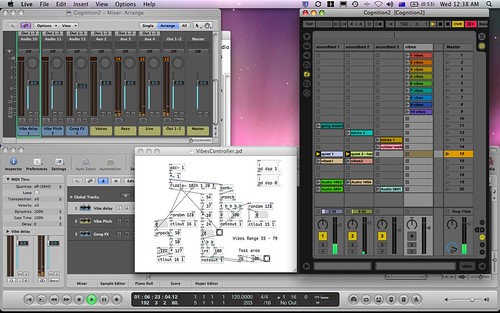
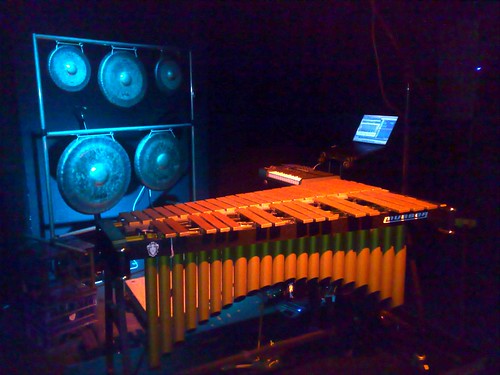
One of my projects is to create improvised duets for computer and vibraphone. My idea is that a computer would play short pre-recorded vibraphone sounds as a counterpoint to my live improvisation. The computer runs a custom piece of software written in the Pure Data language (Pd) to analyse audio input from a microphone over the vibraphone. The computer software is able to recognise attacks and detect the pitch and dynamic of notes that I play. This information is used to send MIDI messages to control software such as (Ableton) Live and (Apple) Logic Studio which plays back the pre-recorded sounds and applies effects.

For example, in a particular improvised piece called Cognition, I divide the vibraphone into ten (imaginary) zones, each one consisting of 3 or 4 adjacent notes. When I strike a note in a particular zone, the Pd program hears the attack and fires off a MIDI message to Ableton Live which then plays one of ten vibraphone recordings. Thus, when I play a melodic line on the vibraphone the computer simultaneously plays a melodic line constructed from sections of the ten recordings. In practice, this simple concept produces a striking variety of sounds from the computer that have a natural and clear relationship to what I play on the vibraphone.

To spice things up, both the live vibraphone sound and the recordings on the computer can be sent to a multitude of effects. I used some interesting reverbs in Logic Studio and complex delays and resonators in Live. Of course, if the effects were on all the time it would cover up the melodic line. Again, my Pd program listens to the live sound and converts the pitch and dynamics that it hears into MIDI messages that tell Logic and Live to send more or less of the live and recorded vibraphone sounds to the effects.

The end result is a setup where I can control effects and recordings from the computer by playing an unmodified vibraphone with only one microphone. In this performance the computer acts more like a musician than the pre-recorded tape that is commonplace in pieces for ``percussion and electronics". Since the sounds that the computer produces are not composed but created as a reaction a live musician this music is a true duet.

Recording of ``Duet for Vibraphone and Computer" as performed in October 2008 at The Street Theatre in Canberra

25 August 2008

Theremin to MIDI Control program in Pd


** Update - throughout 2008 and 2009 I used these techniques with the vibraphone in my piece "Duet for Vibraphone and Computer"

Over the weekend I wrote a simple program in Pd that analyses an audio input and then uses pitch and amplitude information to output a midi control value.

My idea was to use my little theremin as the audio input and send the midi data to an internal midi bus which is received by Ableton Live for controlling parameters of some effects. Since the theremin has such a simple sound the pitch and amplitude analysis works extremely well. To achieve this feat I use the excellent fiddle~ object (written by Miller Puckette) and... well not much else really! A few * and + objects adjust the output values so that they are sensibly distributed between 0-127.

Here's the code (or just copy from the picture!):

#N canvas 738 31 442 441 10;
#X obj 88 21 adc~ 1;
#X obj 88 44 *~ 1;
#X obj 29 91 *~;
#X obj 59 91 tgl 15 0 empty empty empty 17 7 0 10 -262144 -1 -1 0 1
;
#X obj 29 114 dac~ 1;
#X text 9 146 Audio Output!;
#X obj 147 114 unpack;
#X obj 188 177 moses 1;
#X floatatom 219 214 5 0 0 0 Note - -;
#X floatatom 109 214 5 0 0 0 Amplitude - -;
#X obj 117 83 fiddle~ 1024;
#X obj 50 411 ctlout 14;
#X obj 195 411 ctlout 15;
#X obj 222 303 tgl 15 0 empty on empty 17 7 0 10 -262144 -1 -1 1 1
;
#X obj 192 303 *;
#X obj 54 245 *;
#X obj 54 268 +;
#X floatatom 91 245 5 0 100 0 - ampmult -;
#X floatatom 91 265 5 -127 127 0 - ampshift -;
#X obj 190 240 *;
#X obj 190 263 +;
#X floatatom 227 242 5 0 100 0 - pitchmult -;
#X floatatom 227 265 5 0 0 0 - pitchshift -;
#X obj 232 368 tgl 15 0 empty on empty 17 7 0 10 -262144 -1 -1 1 1
;
#X obj 201 368 *;
#X floatatom 212 328 5 0 0 0 - - -;
#X obj 84 303 tgl 15 0 empty on empty 17 7 0 10 -262144 -1 -1 1 1;
#X obj 54 303 *;
#X obj 94 368 tgl 15 0 empty on empty 17 7 0 10 -262144 -1 -1 1 1;
#X obj 63 368 *;
#X floatatom 74 328 5 0 0 0 - - -;
#X text 147 14 Theremin Controller;
#X obj 303 162 loadbang;
#X msg 302 184 \; pitchmult 2 \; pitchshift -80 \; ampmult 1 \; ampshift
20 \;;
#X obj 302 253 loadbang;
#X obj 303 275 s on;
#X text 147 34 Output midi controller data;
#X text 146 49 from pitch and amplitude input.;
#X text 292 402 Charles Martin;
#X text 293 414 25/08/08;
#X text 301 145 Default Settings;
#X connect 0 0 1 0;
#X connect 1 0 2 0;
#X connect 1 0 10 0;
#X connect 2 0 4 0;
#X connect 3 0 2 1;
#X connect 6 0 7 0;
#X connect 6 1 9 0;
#X connect 7 1 8 0;
#X connect 8 0 19 0;
#X connect 9 0 15 0;
#X connect 10 2 6 0;
#X connect 13 0 14 1;
#X connect 14 0 25 0;
#X connect 15 0 16 0;
#X connect 16 0 27 0;
#X connect 17 0 15 1;
#X connect 18 0 16 1;
#X connect 19 0 20 0;
#X connect 20 0 14 0;
#X connect 21 0 19 1;
#X connect 22 0 20 1;
#X connect 23 0 24 1;
#X connect 24 0 12 0;
#X connect 25 0 24 0;
#X connect 26 0 27 1;
#X connect 27 0 30 0;
#X connect 28 0 29 1;
#X connect 29 0 11 0;
#X connect 30 0 29 0;
#X connect 32 0 33 0;
#X connect 34 0 35 0;
To check it out, copy and paste the code into a text editor, save it as a .pd file, then open in Pd! Click the little toggle boxes to first to view the data and then to send it to the midi output. This way you can shut off output of one parameter while you have Live (for example) learn the assignment.

** Update - The program was a little bit wrong. Fixed now! Hello internet!

17 August 2008

Pure Data Resources

When I started learning Pure Data (or Pd) a couple of weeks ago, it was difficult to find good tutorials and examples. In the end I used a couple of different tutorials to take my first steps in this language:
  1. Linux Journal's Managing Audio with Pd. This is a simple absolute beginner's tutorial for Pd that explains the basic operations and aims to create a simple delay effect.
  2. The Tutorials that come with Pd! Pd comes with many (really a lot) of great tutorial patches. If you download Pd, you can go into the installed folder (on Mac OS X right click the Pd application and select ``Show Package Contents") and find the folder called ``doc". Inside here are numbered chapters of an enormous tutorial for Pd! Another way to find this folder is download the source code for Pd.
  3. Miller Puckette's book: The Theory and Technique of Electronic Music. This is a textbook written by the creator of Pd which uses the language to illustrate all the examples. It's distributed online for free!
  4. The help patches! When you're editing a Pd patch, you can right click on object and select ``Help". This (usually) opens another patch that explains the function of the object and gives an example. Awesome!